Checklists & inspections
Model sections, items, weights, and rules. Run online or offline with evidence (photo, audio, video), signature, and geolocation.


SmartApp is the checklist and inspection app for regulated operations: offline execution, evidence per item, action tracking, and native SoftExpert Suite integration.
Product
From template to execution, from occurrence to closure — and from the field to SE Suite.
Model sections, items, weights, and rules. Run online or offline with evidence (photo, audio, video), signature, and geolocation.
Record occurrences and nonconformances with type, priority, SLA, and owner. Track action, cause, response, and resolution on an auditable timeline.
Connect checklists, responses, weights, and attachments to SoftExpert Suite — without manual re-entry and without breaking governance.
Applicability
Examples by industry — standards, inspections, and field routines that Smart apps help standardize, evidence, and connect to governance.
Assets, inspections, and NR-13
Open industry page
Mine, equipment, and HSE
Open industry page
Food safety, hygiene, and NR-13
Certifications and process compliance
HSE and Responsible Care
Operations, equipment, and safety
Sites, quality, and safety
Platform
The team executes · the system proves it
Checklists and inspections with offline execution, evidence per item, and native integration with SE Suite. An unannounced audit leaves no time to reconstruct records — evidence is captured at inspection time, not the night before.
Standards and applicability
Industries served
Sections, items, response types, required fields, weights, and rules. Bulk import via spreadsheet.
Current and draft versions kept separate, review cycles, validity with periodic revalidation, and full traceability.
Individual, team, or company-level permissions with automatic propagation. Attributes by unit, area, project, client, and asset.
Checklist, team, occurrences, attributes, and map. Cross-filters and drill-down to individual instances.
Custom templates with company branding, content selection, signatures, generation, and distribution.
Local database on device, Quiz and List execution modes, automatic sync of responses, evidence, and occurrences on reconnect.
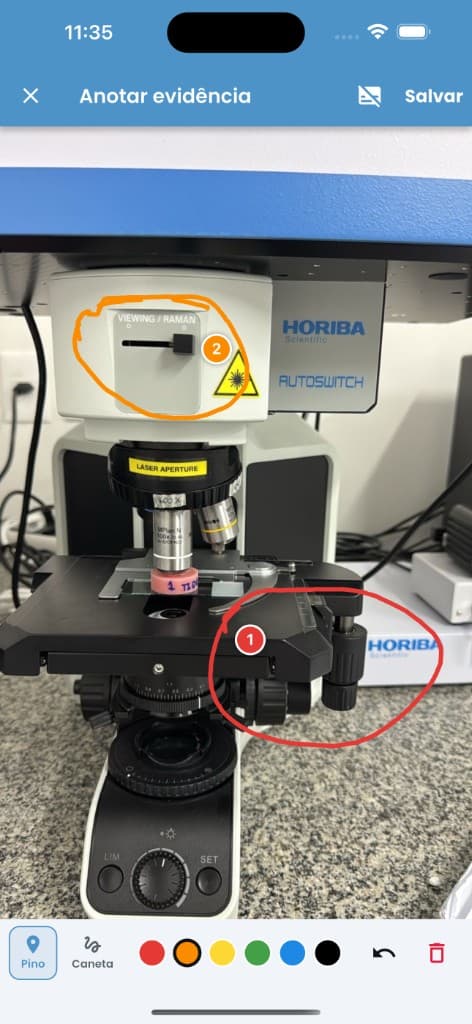
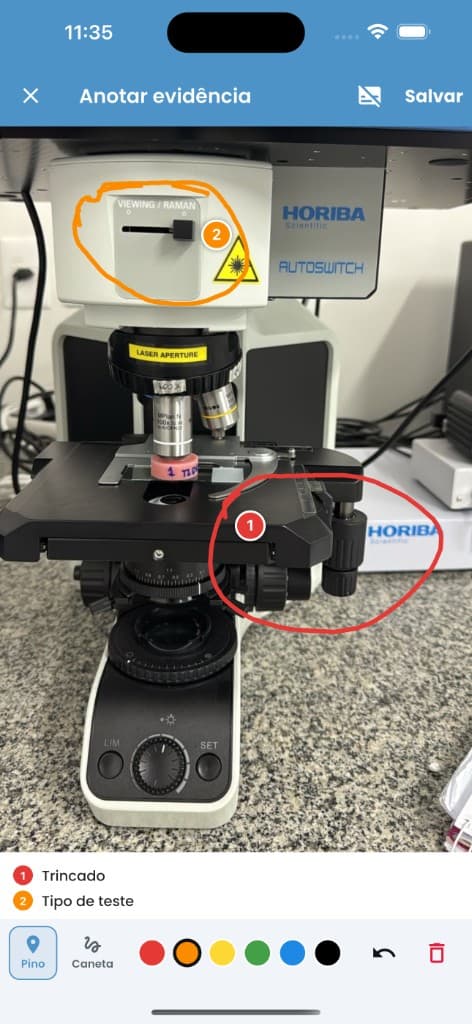
Photo, audio, and video per item. Markup on the photo itself — numbered pin with caption and freehand pen in six colors. Signature and geolocation at four levels.
Type and priority, response SLA and owner. Structured records for Action, Cause, Response, and Resolution with an auditable timeline.
Rules engine and weighted scoring · Formula-based calculated responses · Conditional responses · Geolocation per response, instance, evidence, and signature · Photo markup — Severity assessment · Two-step authentication · Proprietary sequential numbering · Audit trail and revision traceability
Public or dedicated
Connects to the company's management systems
Where inspection happens
Capabilities
Everything operations need to create, run, and audit checklists — in the field and in management.
Build templates with sections, questions, answer types, required fields, weights, and rules tailored to each operation.
Run checklists in the browser or mobile app, even without internet. Answers, evidence, and data sync when connectivity returns.
Configure questions that appear or disappear based on previous answers, creating simpler flows for each inspection.
Attach photos, videos, audio, and documents directly to answers, with per-item control and later review.
Define when an answer requires justification, evidence, immediate action, an occurrence, or a document — preventing incomplete closures.
Assign weights to questions and answers to automatically calculate checklist scores.
Build calculated questions with formulas from other answers — sums, averages, and indicators at execution time.
Classify the result into reusable ranges, with business text, color, and requirements for each interval.
Standardize evaluation impact with severity levels — low, moderate, high — and use them in occurrences and reports.
Record deviations, track nonconformities, and centralize key information for decision-making.
Generate PDF reports with inspection data, answers, evidence, and complementary information.
Integrate checklists, answers, weights, and attachments with SoftExpert / SE Suite through automated flows.
Import checklists, sections, items, rules, and users from spreadsheets, reducing manual setup work.
Register users, roles, teams, and access levels, with credentials sent by email.
Adapt checklists by unit, area, project, customer, supplier, item, SoftExpert process, and other business lists.
Keep a history of answers, evidence, instance status, and synced data for review and audits.
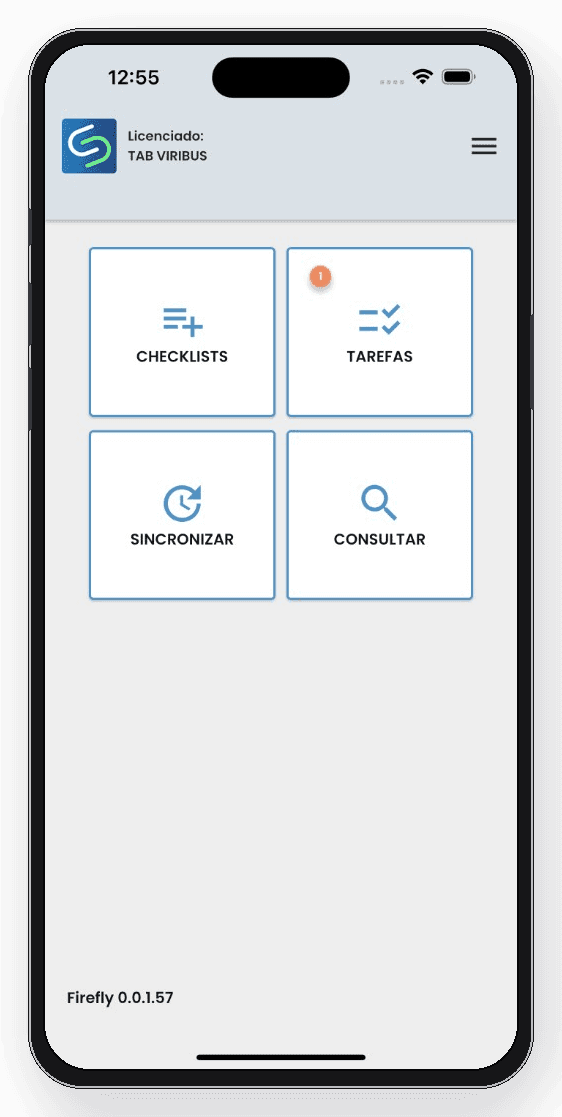
Mobile
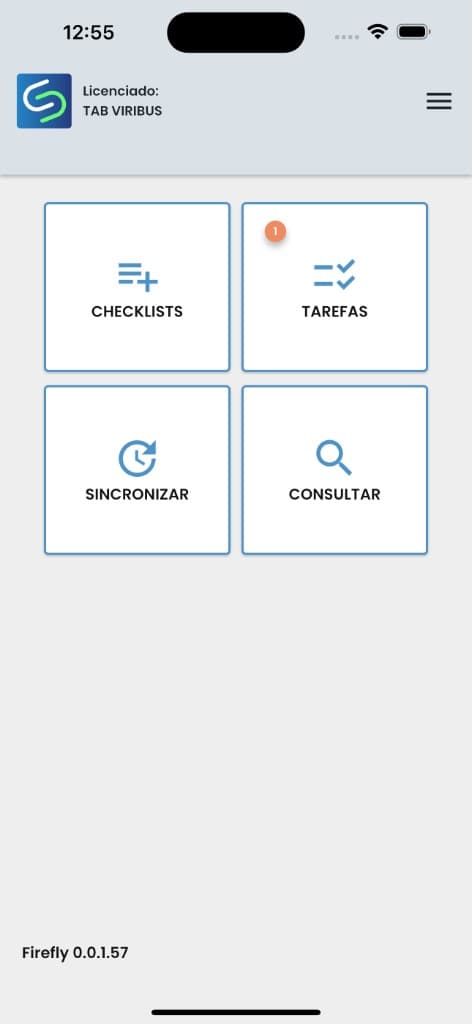
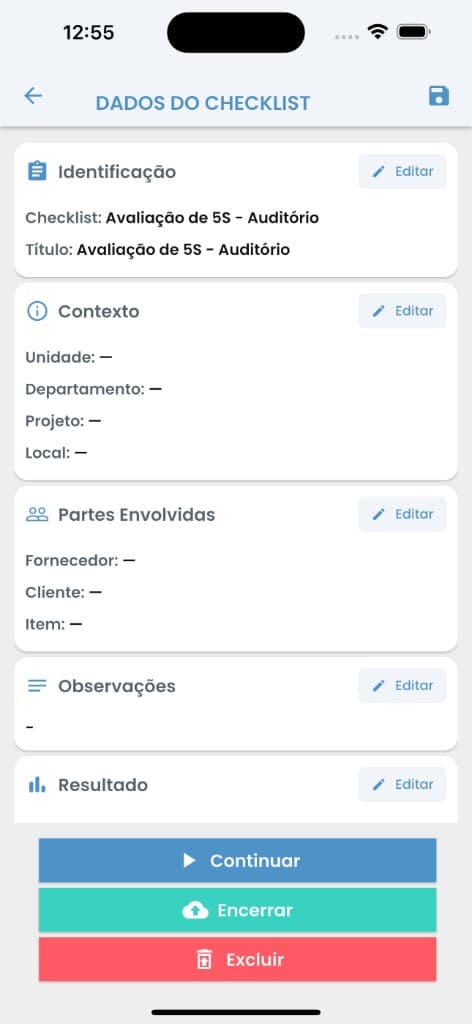
Unlimited checklist creation for any purpose with a user-friendly interface.
Library of checklists for common use cases.
Use the app anytime, anywhere — even without an internet connection.
On mobile, the checklist guides answers with compliance, parameters, and automatic rules — requiring evidence, justification, or deviation when needed.
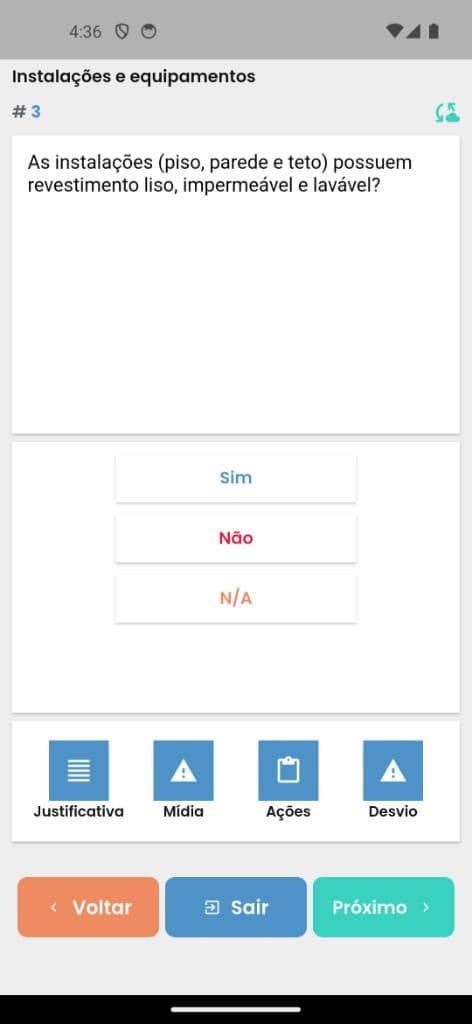
Fast answers (compliant, non-compliant, N/A) with a clear path to evidence, media, actions, and deviations.
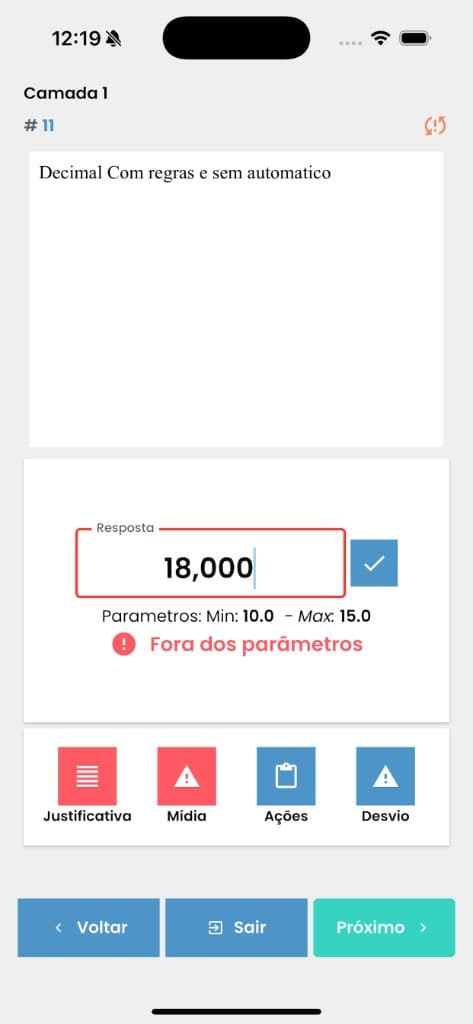
Answers with min/max parameters, out-of-range alerts, and blocked progress until the value is corrected or justified.
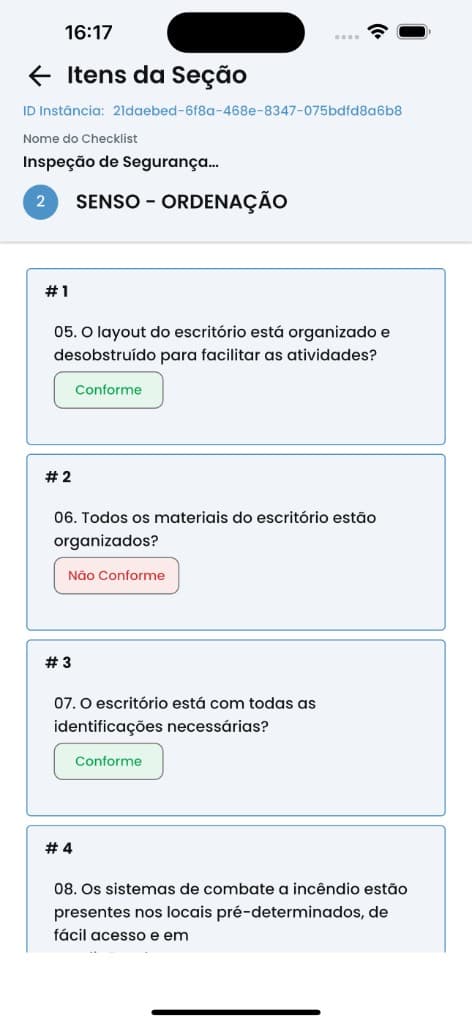
When an answer triggers a rule, the app highlights justification, media, and deviation to keep traceability on the spot.
Evidence
Annotate right on the image: numbered pin with caption and freehand pen in six colors. Evidence is clear for whoever handles the occurrence — no need to explain later.
Integration
A complete flow — execution, synchronization, and treatments
Field capture
Your team records checklists online or offline in SmartApps Checklist — without losing pace, even without a connection.
Instant handoff
The treatment team is notified immediately and receives the activity ready in SoftExpert.
Governed integration
The integration opens the instance, organizes answers and evidence into grids, triggers NCs, emails, and attached reports — with end-to-end traceability.
Treatment with impact
In SoftExpert, treatment moves forward with Root Cause Analysis and an Action Plan — from field to decision in one flow.
How it works
From field capture to governance and treatments in SoftExpert — no rework, with end-to-end traceability.
01
Field teams execute the checklist in Smart apps. Answers and evidence are queued and synced with SoftExpert, with visible retries and status.
02
In SoftExpert, the SmartApp Checklist portal consolidates record KPIs and the list of synced checklists.
03
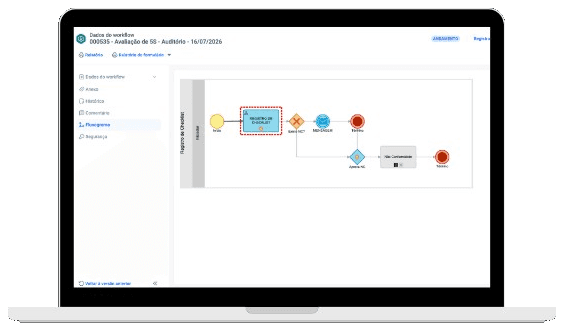
Each send opens or updates the Checklist Registration workflow, with data, history, an attached report, and email notifications.
04
The responsible team receives the demand and handles nonconformities, justifications, actions, and evidence — including NC approval when required.
Applicability
The same model connects those who record in the field with those who analyze, approve, and treat in the back office.
Equipment, assets, safety, maintenance, and operational routines.
5S, quality, standards, suppliers, and compliance checks.
Technical visits, occurrences, tickets, and field validations.
Work orders, contractor execution, and proof of delivery.
Surveys, measurements, research, and structured records.
SoftExpert flow
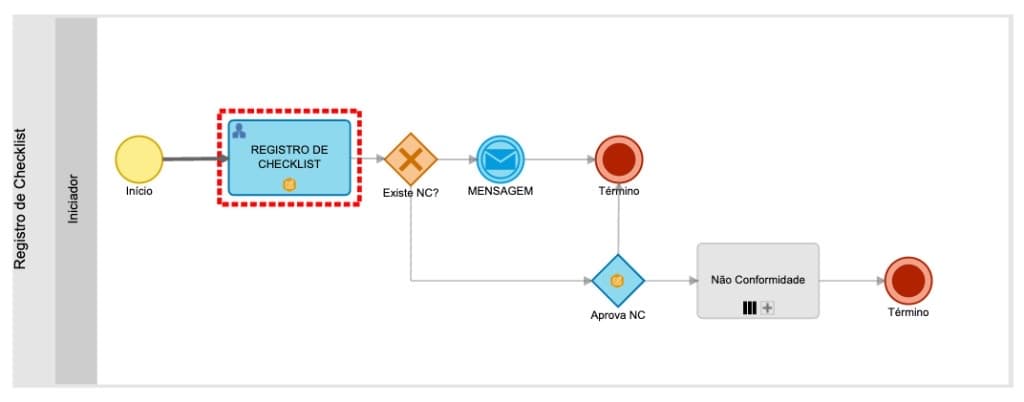
The workflow starts at registration, checks for NC, and routes to a closing message or to approval and nonconformity treatment.
Portals
Two portal axes: record monitoring with dashboards and the list of synced checklists.
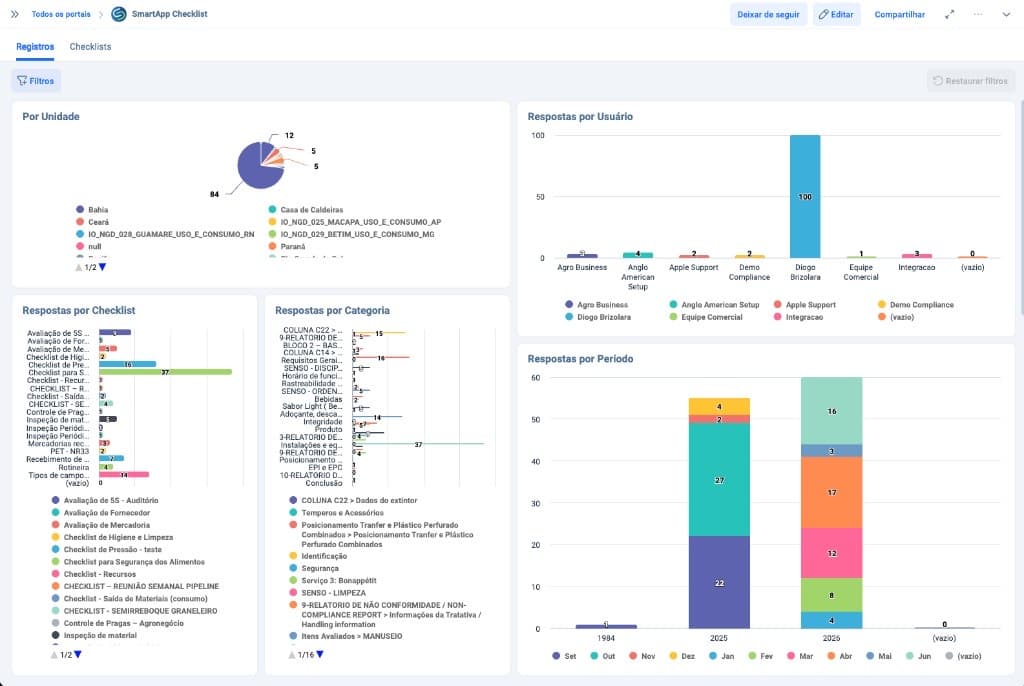
Charts by unit, user, checklist, category, and period — a management view of what was executed in the field.
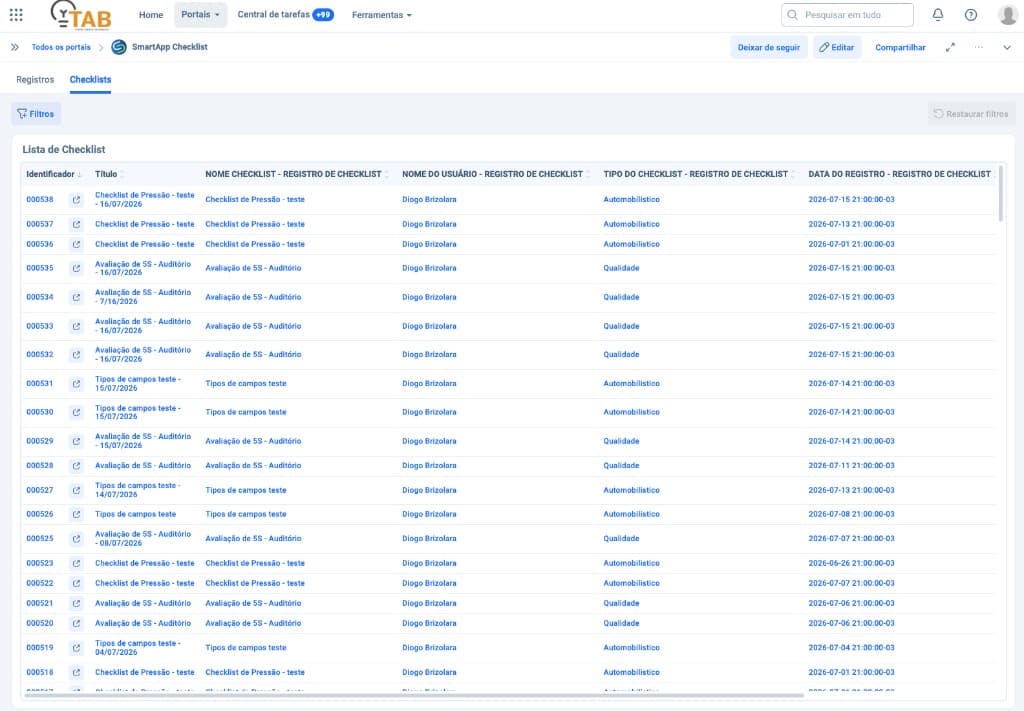
Grid with SoftExpert ID, title, type, user, and registration date — a clear bridge between app and suite.
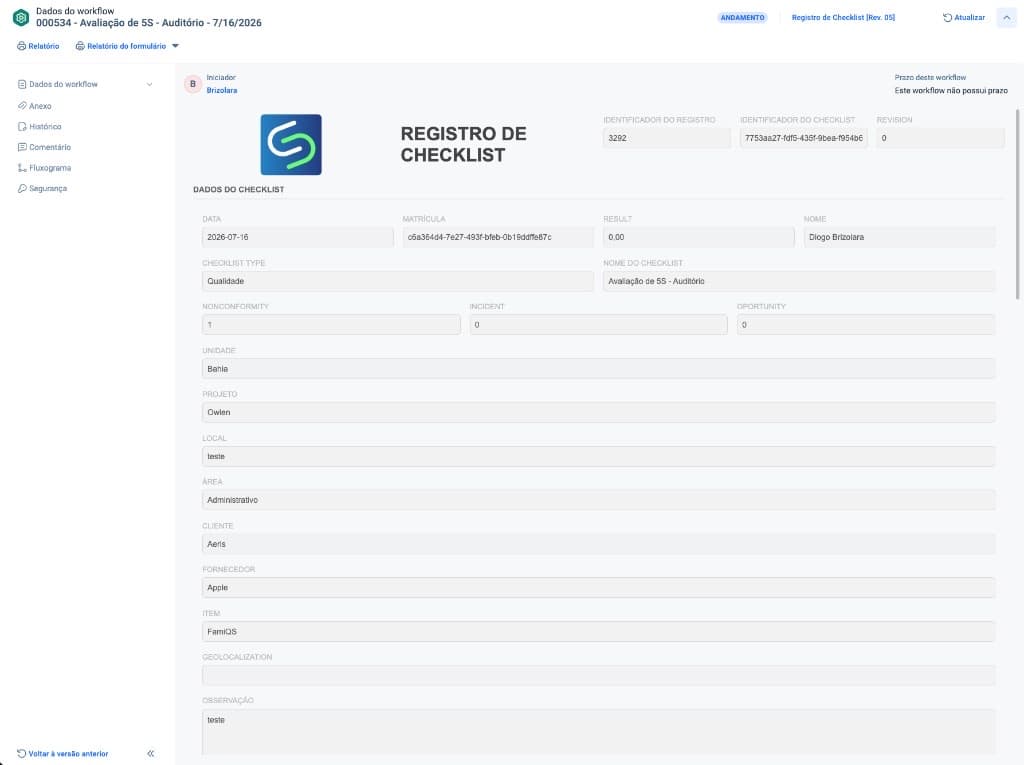
Instances
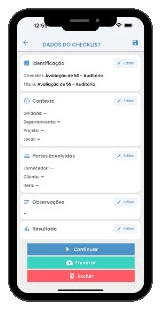
The instance brings the checklist header, KPIs (nonconformity, incident, opportunity), unit, area, customer, and other synced attributes. The final report can be received as an attachment, with involved teams notified by email.
Grids and evidence
In SoftExpert, sections appear as separate grids. Each answer can open detail, justification, action, and photographic evidence.
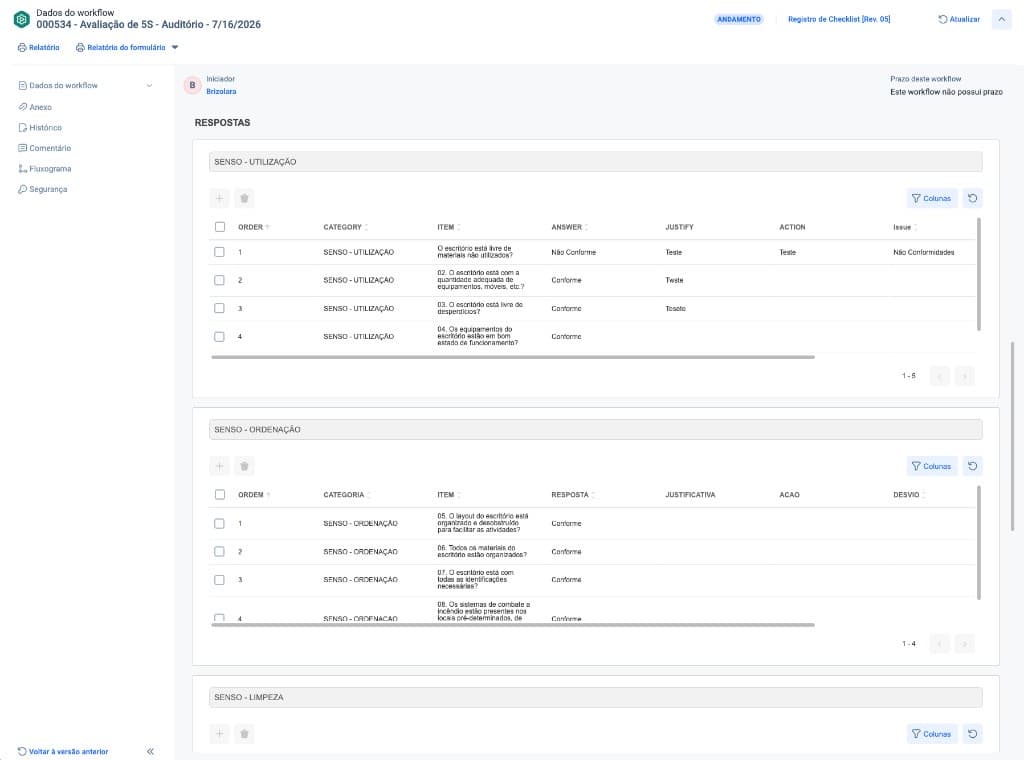
Tables by category with order, item, answer (compliant / non-compliant), justification, action, and deviation.
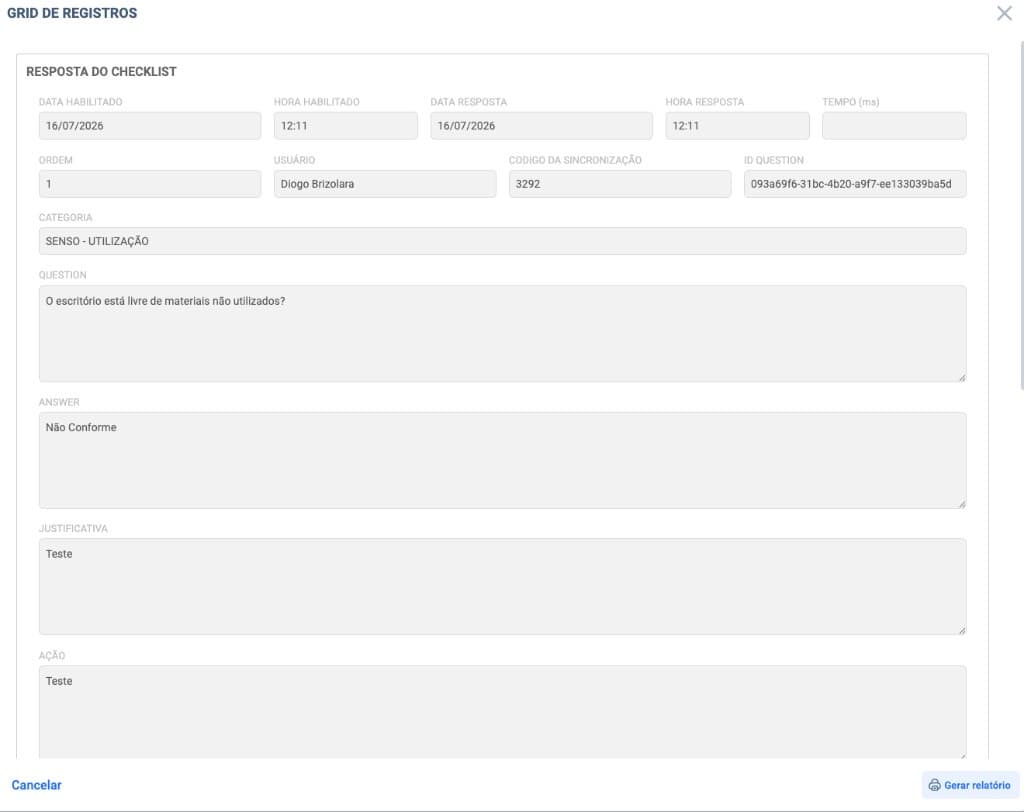
Modal with question, answer, justification, action, user, and synchronization code.
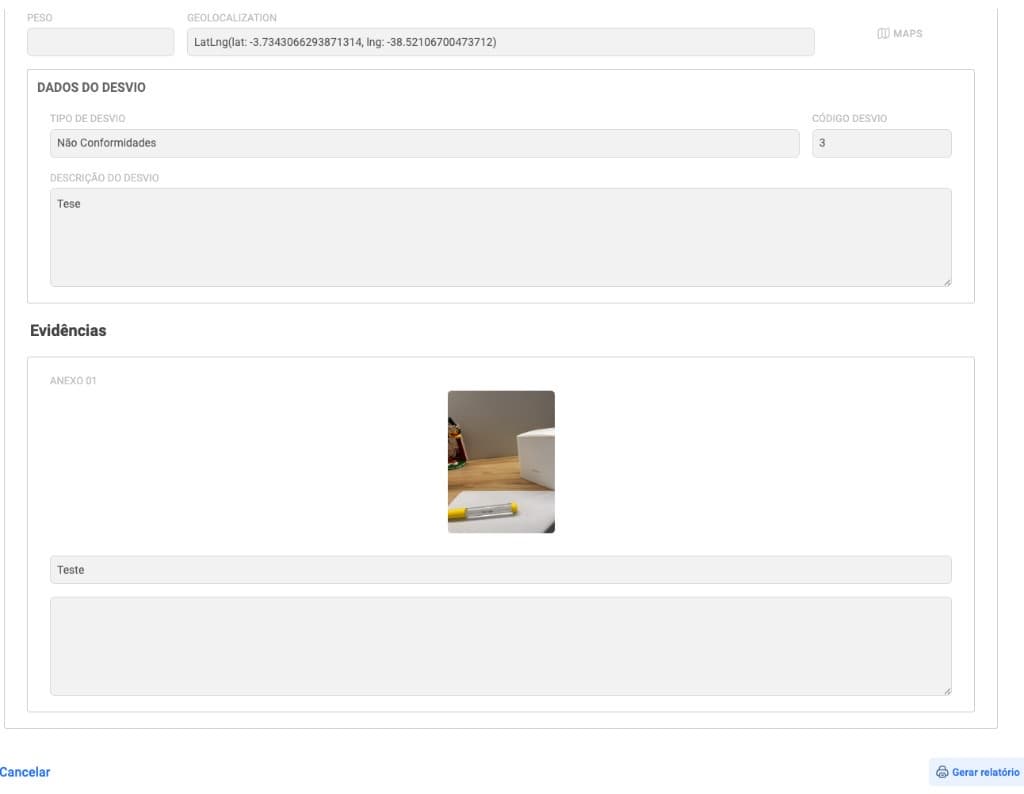
Deviation type and description, geolocation, and attachments with photo and caption — audit-ready evidence.
Attached report
Once synchronization is complete, Smart apps generates the report and sends it as an attachment to the SoftExpert instance. It brings together execution data, summary, answers, deviations, evidence, and signatures.
SmartApp · Report
Unit
Bahia
Area
Administrative
Type
Quality
User
Diogo Brizolara
Instance ID
3140
Revision
Rev. 5
22
Total answers
13
Compliant
3
Nonconformities
81%
Compliance
| Category | Answers | Compliance |
|---|---|---|
| SEIRI — Sort | 5 | 60% |
| SEITON — Set in order | 4 | 100% |
| SEIKETSU — Standardize | 4 | 75% |
| SHITSUKE — Sustain | 3 | 100% |
Is the office free of unused materials?
Compliant
Evidence attached · occurrence recorded · geolocation
Does the office have the appropriate amount of equipment?
Non-compliant
Ticket opened · justification and corrective action
The report may also include images, audio, deviations, geolocation, and signature/approval fields.
Integration history
Without exposing the technical payload: track status (waiting, processing, completed, error), filter by instance, answer, or attachment, and open the timeline with SoftExpert IDs.
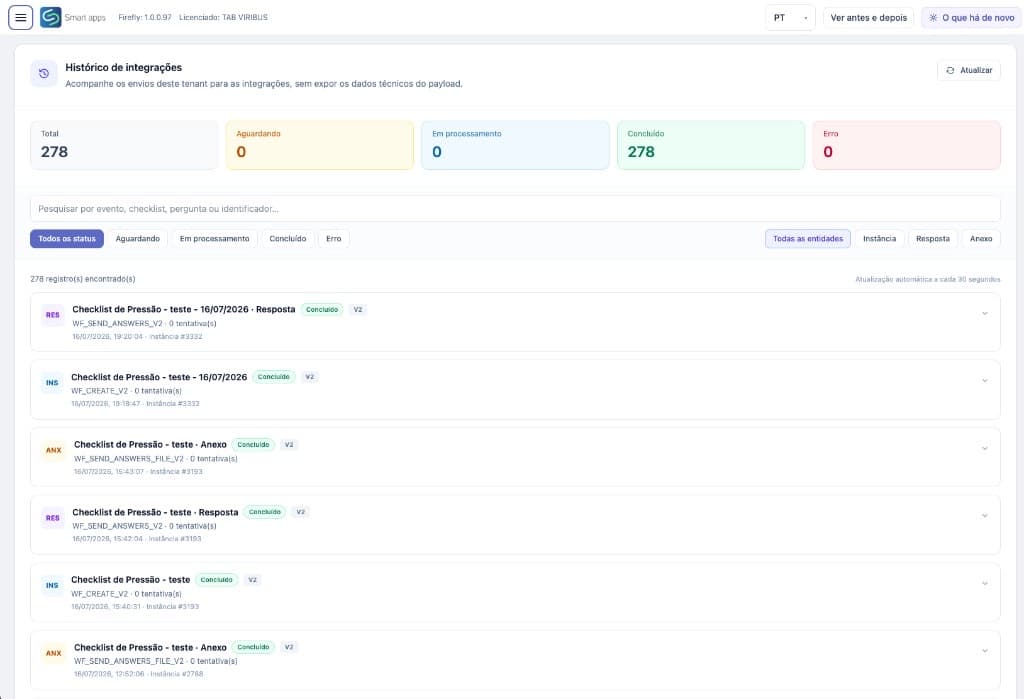
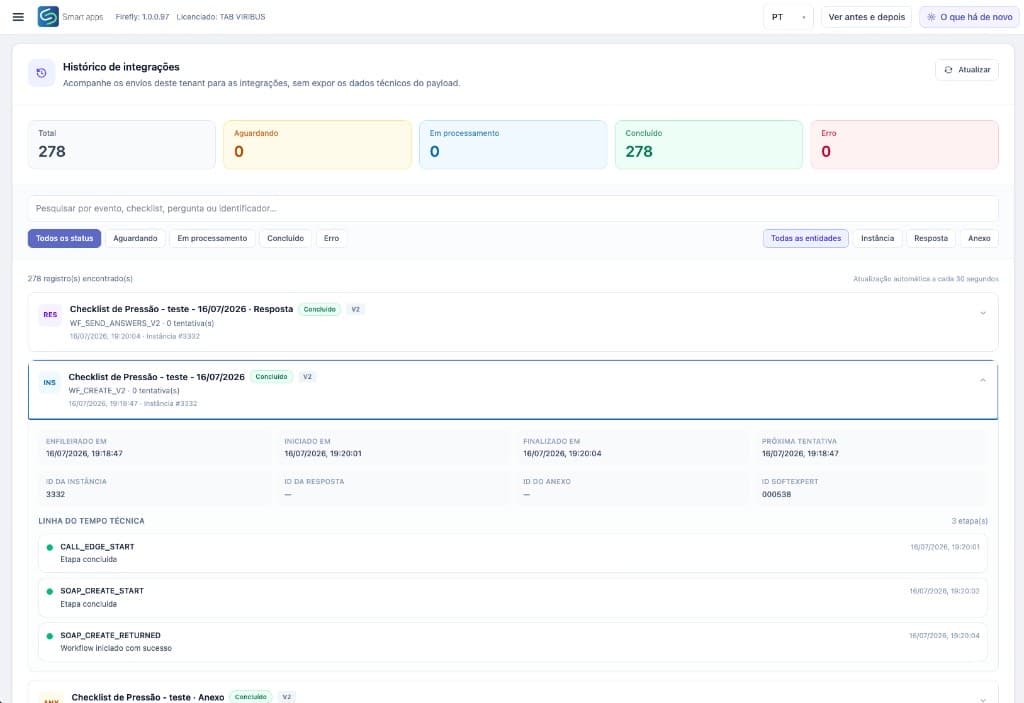
Workflow creation in SoftExpert with SoftExpert ID and SOAP timeline.
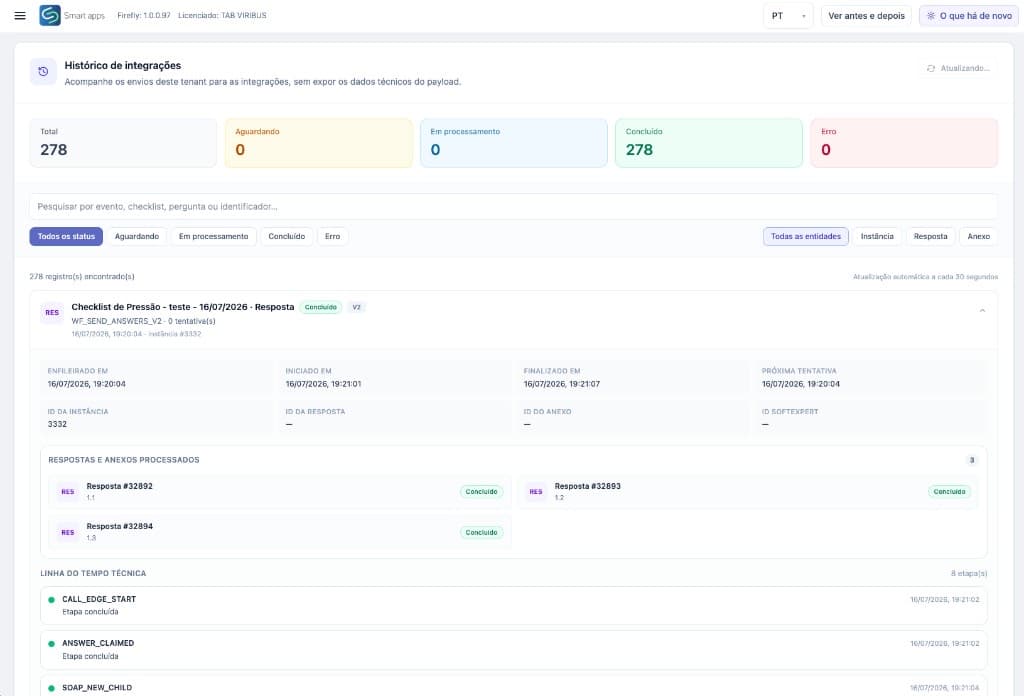
Processed answers sent item by item, with status and retries.
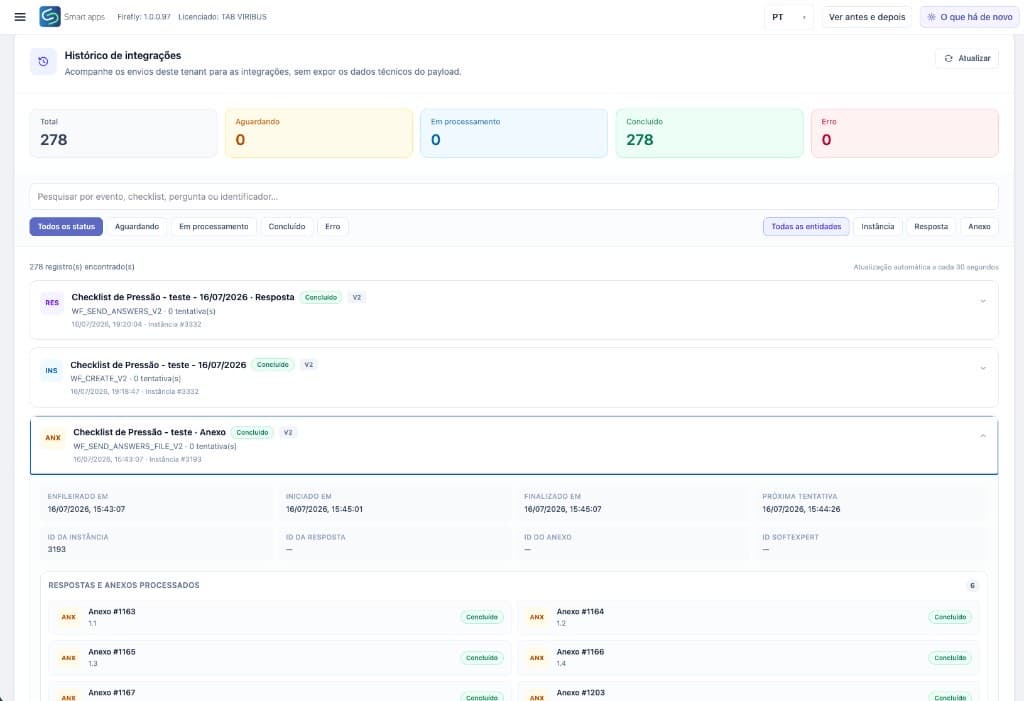
Evidence synced as attachments, linked to the instance.
Personalized access based on your operation's needs.
| Feature / Plan | Basic | Start | Pro | Enterprise |
|---|---|---|---|---|
| Web users | up to 1 | up to 5 | up to 10 | Unlimited |
| Registered checklists | Unlimited on all plans | |||
| Checklists answered per month | 600 | 1,500 | 5,000 | On demand |
| Attachment storage (photos, docs, justifications) | 2 GB included | 10 GB included | 50 GB included | 100 GB included |
| Storage overage | R$ 2.00 / GB | R$ 1.50 / GB | R$ 1.20 / GB | R$ 1.00 / GB |
| Dashboard & Reports | Simple reports | Basic | Advanced + export | Custom reports |
| Mobile and Offline App | ||||
| Execution Route | — | — | ||
| Custom Response Flow | — | — | ||
| Calculated items | — | — | ||
| Score evaluation | — | — | ||
| Answer severity | — | — | ||
| Nonconformance (NC) Process | — | — | ||
| Action Plan (5W2H) | — | — | ||
| SoftExpert Integration | — | — | ||
| Support | Email (48h) | Email (48h) | SLA (24h) | Dedicated |
Contact
Tell us about your checklist, inspection, and action-tracking operation. We will follow up with the best evaluation path.
85 4042-3967 — CE
11 3164-4675 — SP
comercial@tab.pro.br